Program List
After starting the Peter application or after completing the program edition a program list will be displayed. This program list is intended to manage the programs and to select the program to be edited.
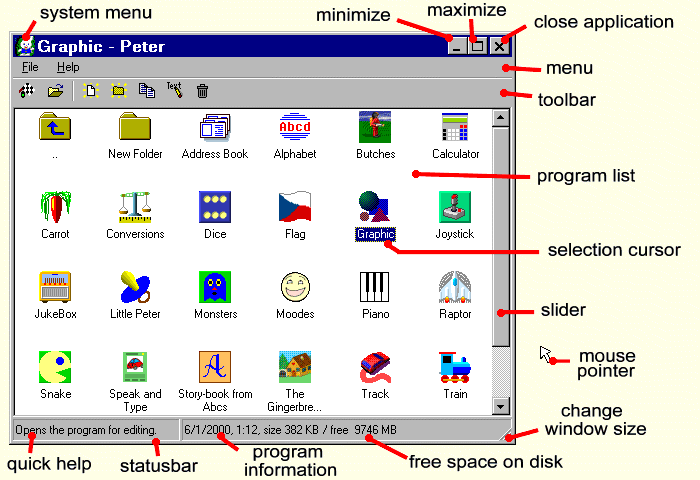
Tips:
Starting a program The selection cursor is set on the program, Start is chosen in the menu or the Enter (or F5 ) key is pressed.
A new program New is selected in the menu or the Ctrl+N keys are pressed and the name of the new program is entered.
Program edition The selection cursor is set on the program, Open is selected in the menu or the Ctrl+O keys are pressed.
Rename The selection cursor is set on the program or on the folder, Rename is selected in the menu or the Alt+Enter keys are pressed.
Making a copy The selection cursor is set on the program, Copy is selected in the menu or the Ctrl+C keys are pressed.
A new folder New Folder is selected in the menu or the Ctrl+P keys are pressed and the name of the new folder is entered.
Delete The selection cursor is set on the program or on the folder, Delete is selected in the menu or the Delete key is pressed.
Changing a folder The selection cursor is set on the folder and the Enter key is pressed.
End of application Exit is selected in the menu or the Alt+F4 keys are pressed.
Notes:
- A folder denoted as " .. " is intended to be returned into the parent folder
- In program and folder names no reserved characters * | \ : " < > ? / may be used.
- A folder that is not empty cannot be deleted
- A program saved in a non-executable manner will be opened for edition instead of starting
- A program to be deleted is transferred into the Backup folder
The program list includes both sample programs and modified as well as an own programs. By opening a sample program and by its saving the program will be stored in user's own working folder. Sample programs cannot be neither renamed nor deleted. By deleting a modified program the original program sample version will be restored.