Editing a Number
When editing a numerical variable an edit line is displayed in the middle of the edit panel. This edit line serves for entering or changing the value of a number.
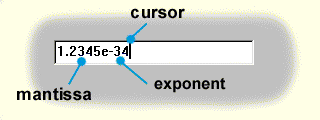
The text of a number is entered without spaces. The number can be preceded by a sign, + or - . The number mantissa can include up to 15 numerals and a decimal point or a comma. The mantissa can be followed by an exponent separated by E or e . The exponent is an integer ranging between -308 and +308 .
A number can be entered in the hexadecimal form by inserting the $ (dollar) character in front of the number. Thus e.g. the entry $1F corresponds the number 31 . Similarly, by inserting the % (the percent character) a number can be entered in the binary form. Thus e.g. the entry %1001 corresponds the number 9 .
Editing operations
marking a text - Shift the mouse pointer, concurrently holding the left mouse button pressed.
- Shift the cursor by the arrow keys, concurrently holding the Shift key.
- Double click with the mouse on the text; the whole text will be marked.
- Click Ctrl+A ; the whole text will be marked.
unmarking a text - Click with the mouse into the text.
- Shift the cursor by the arrow keys.
deleting a text - Press Delete or Back Space .
putting a marked text to the clipboard - Press Ctrl+C (copy) or Ctrl+X (cut).
returning a text from the clipboard - Set the cursor on the desired position and press Ctrl+V .
returning the original number - Press Ctrl+Z .
undoing the number return - Press Ctrl+Y .